
Sidemark for VS Code
Sidemark brings MRSF review comments directly into Visual Studio Code — add, manage, navigate, and reanchor comments without ever leaving your editor or touching your Markdown source files.
Install
Search for "Sidemark" in the VS Code Extensions view, or install from the Visual Studio Marketplace.
Requirements: VS Code 1.85+ · Git recommended (enables commit-based staleness detection and diff-based reanchoring)
Features
Gutter Icons & Inline Highlights
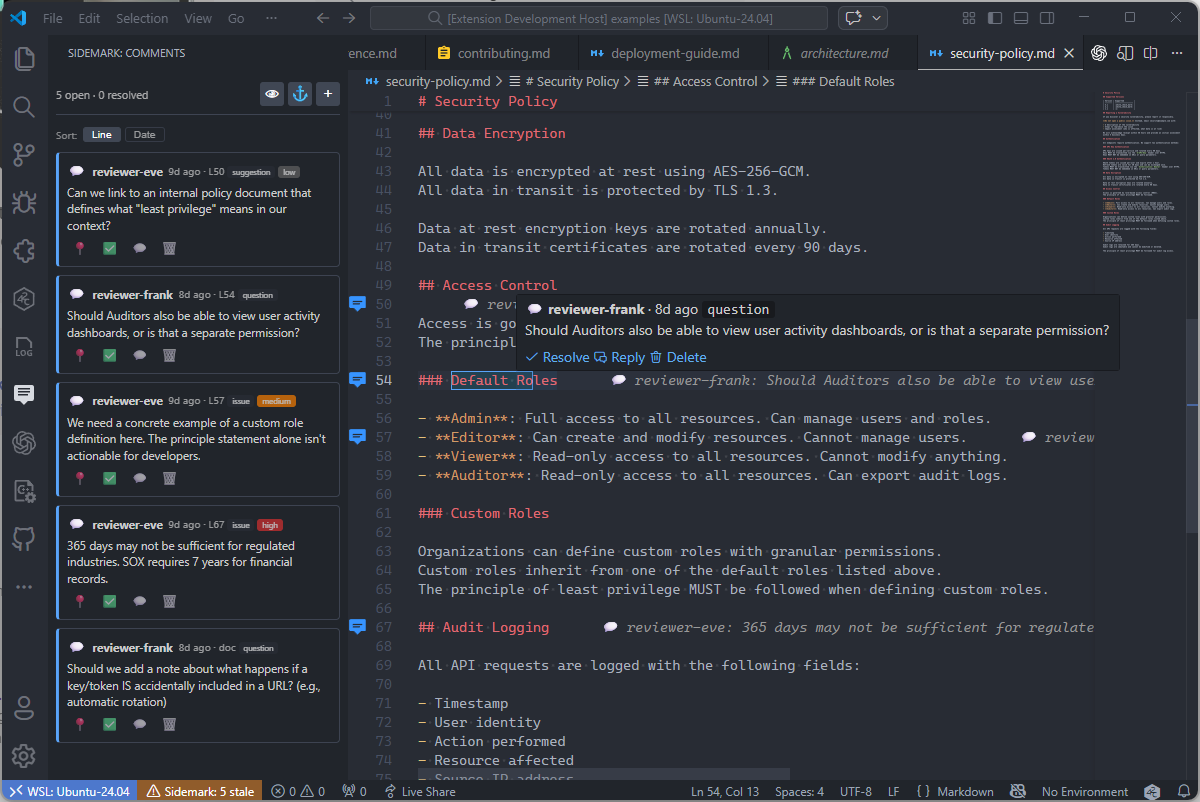
Every commented line gets a color-coded gutter icon:
| Icon | Meaning |
|---|---|
| 💬 | Open comment(s) |
| ✅ | All resolved |
| ⚠️ | Orphaned anchor |
| 🔢 | Multiple comments on the same line |
Inline/column-span comments are highlighted directly in the editor text with a subtle background color.
Inline Preview Text
Each commented line shows a compact inline preview — similar to how GitLens shows blame annotations — displaying the author and a snippet of the comment text right next to the code.
Rich Hover Cards
Hover over any commented line to see the full comment thread with author, timestamp, status badges, and one-click action links:
- Resolve / Unresolve — toggle comment state
- Reply — add a threaded reply
- Delete — remove the comment
Sidebar Panel
A dedicated Sidemark activity-bar panel lists all comments for the active Markdown file:
- Sort by line number or date
- Toggle resolved comments visibility
- Filter to show unresolved only
- Navigate to any comment with a single click
- Reanchor all comments from the sidebar
- Orphaned comments are highlighted with a warning badge and count
- Add new comments directly from the panel
Automatic Reanchoring on Save
When you save a Markdown file, Sidemark silently reanchors all comments using the MRSF multi-step resolution algorithm:
- Exact text match — finds the selected text at any position
- Fuzzy match — handles minor edits with configurable threshold
- Diff-based shift — uses git diffs for precise line shifting
- Line fallback — falls back to positional anchoring
High-confidence results are applied automatically; uncertain results are flagged for manual review.
Interactive Reanchor Review
Run Sidemark: Reanchor Comments from the command palette for a guided review session. Each uncertain result is shown with old/new anchor decorations and accept/reject/skip controls.
Anchor Drift Detection
When you insert or delete lines, the status bar warns that comment anchors may have drifted. Saving the file clears the warning after reanchor runs.
Staleness Warnings
If any comments reference a different git commit than HEAD, the status bar shows an orange warning with the count of stale comments. Click to reanchor.
Commands
| Command | Description |
|---|---|
Sidemark: Add Line Comment | Add a comment on the current line |
Sidemark: Add Comment on Selection | Add an inline comment on the selected text |
Sidemark: Reply to Comment | Reply to an existing comment |
Sidemark: Resolve Comment | Resolve a comment (with optional cascade) |
Sidemark: Unresolve Comment | Unresolve a previously resolved comment |
Sidemark: Delete Comment | Delete a comment |
Sidemark: Reanchor Comments | Run interactive reanchor for uncertain results |
Sidemark: Go to Comment | Navigate to a comment's anchor position |
Sidemark: Refresh Comments | Reload the sidecar from disk |
All commands are also available from the editor context menu (right-click) on Markdown files.
Default Keyboard Shortcuts
Sidemark ships with default multi-key shortcuts for adding comments in the editor:
| Action | Windows / Linux | macOS |
|---|---|---|
| Add Comment on Selection | Ctrl+Alt+M, Ctrl+I | Cmd+Alt+M, Cmd+I |
| Add Line Comment | Ctrl+Alt+M, Ctrl+L | Cmd+Alt+M, Cmd+L |
These are chord shortcuts, so press the first key combination and then the second.
Settings
All settings are under the Sidemark section in VS Code Settings.
| Setting | Type | Default | Description |
|---|---|---|---|
sidemark.author | string | "" | Default author name for new comments |
sidemark.showResolved | boolean | true | Show resolved comments in decorations and sidebar |
sidemark.gutterIcons | boolean | true | Show gutter icons for commented lines |
sidemark.inlineHighlights | boolean | true | Show inline background highlights for text-specific comments |
sidemark.reanchorOnSave | boolean | true | Automatically reanchor comments on save |
sidemark.reanchorThreshold | number | 0.6 | Fuzzy match threshold for reanchoring (0.0–1.0) |
sidemark.reanchorAutoAcceptScore | number | 1.0 | Auto-accept reanchor results at or above this confidence |
How It Works
Sidemark stores review comments in sidecar files alongside your Markdown documents, following the MRSF v1.0 specification:
docs/
  architecture.md                    ← your document
  architecture.md.review.yaml       ← sidecar with comments
Comments are anchored to specific lines or text ranges using line, end_line, start_column, end_column, and selected_text. When the document is edited, the reanchor algorithm relocates comments automatically.
Alternate Sidecar Location
Place a .mrsf.yaml at your repository root to store sidecars in a central directory:
sidecar_root: .reviewsWith this config, the sidecar for docs/architecture.md resolves to .reviews/docs/architecture.md.review.yaml.
Related Tools
- CLI Reference — command-line access to validate, add, resolve, reanchor, and list comments
- MCP Server — AI agent integration via Model Context Protocol
- MRSF Specification — full format specification